
How to Deposit in 2J Bet (JazzCash & Easypaisa) ?
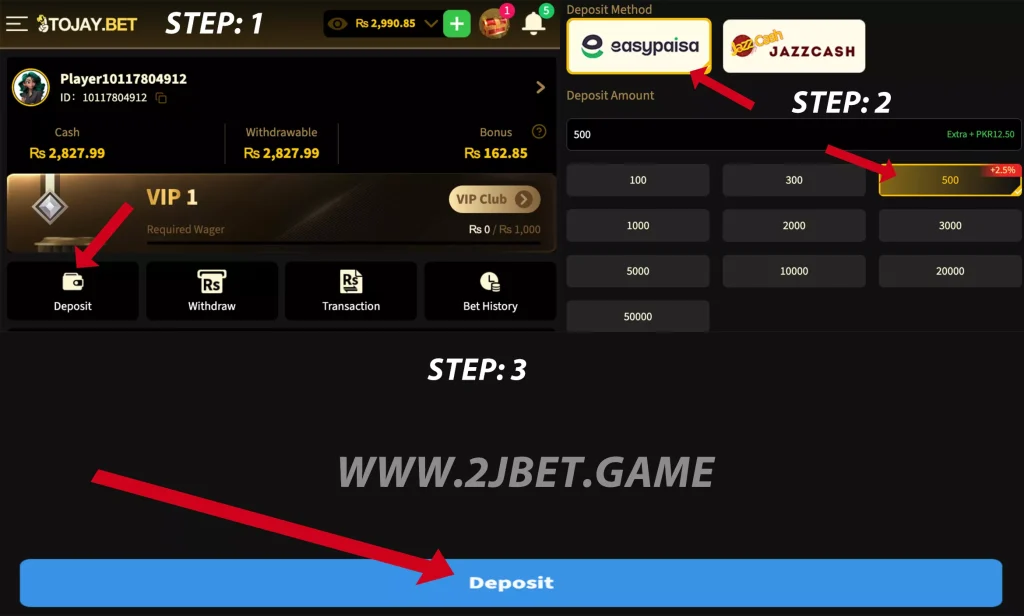
Depositing money in 2J Bet (ToJay Bet) is very simple, and you can add balance using JazzCash or Easypaisa within a few steps. The deposit screen inside the app is easy to understand, and you only need to enter the amount and send payment to the wallet number shown.
If you have not created your account yet, please complete registration first: How to Register on 2J Bet
Once you are registered and logged in, follow the steps below.
Steps to Deposit
- Open the 2J Bet app
- Tap on Deposit at the top
- Select Easypaisa or JazzCash
- Enter the amount you want to deposit
- Tap Deposit / Pay Now
- A wallet number will appear
- Open your JazzCash/Easypaisa app and send payment
- Return to 2J Bet and tap I Have Paid / Confirm
Your balance will update shortly after the payment.
Useful Tips
- Double-check the wallet number before sending money
- For JazzCash, enter the correct CNIC if asked
- Keep your transaction ID / screenshot safe
- Deposit from your own number for smooth support
If Balance Doesn’t Show
Sometimes it takes a little time. If your deposit doesn’t appear:
- Wait a few minutes
- Go to Support inside the app
- Send your payment screenshot and number
Your amount will be added after verification.